

OAuth 2.0 Client Credentials Authentication
Authenticate using OAuth 2.0 Client Credentials flow with Vainu API
Client Credentials is an OAuth 2.0 authentication method designed for machine-to-machine communication. It's ideal for backend applications, integrations, and automated systems.
Clients can be created and managed from Vainu UI. Each Oath 2.0 client:
- Can be activated/inactived and deleted
- Client Secret can be rotated
- Optional expiry date can be set
- See when access token was previously generated with this App
Overview
The Client Credentials flow exchanges your client ID and client secret for an access token. Unlike JWT tokens, there's no refresh token lifecycle - you simply request a new access token when needed.
Credentials
- Client ID - Unique identifier for your application
- Client Secret - Secure secret (keep this confidential!)
Getting Client ID and Client Secret
You can create OAuth 2.0 Application in the Vainu Platform UI Direct: https://vainu.app/settings/api-access (Settings -> API Access).
Click "Create application". Give your Application name and optional expiry date.
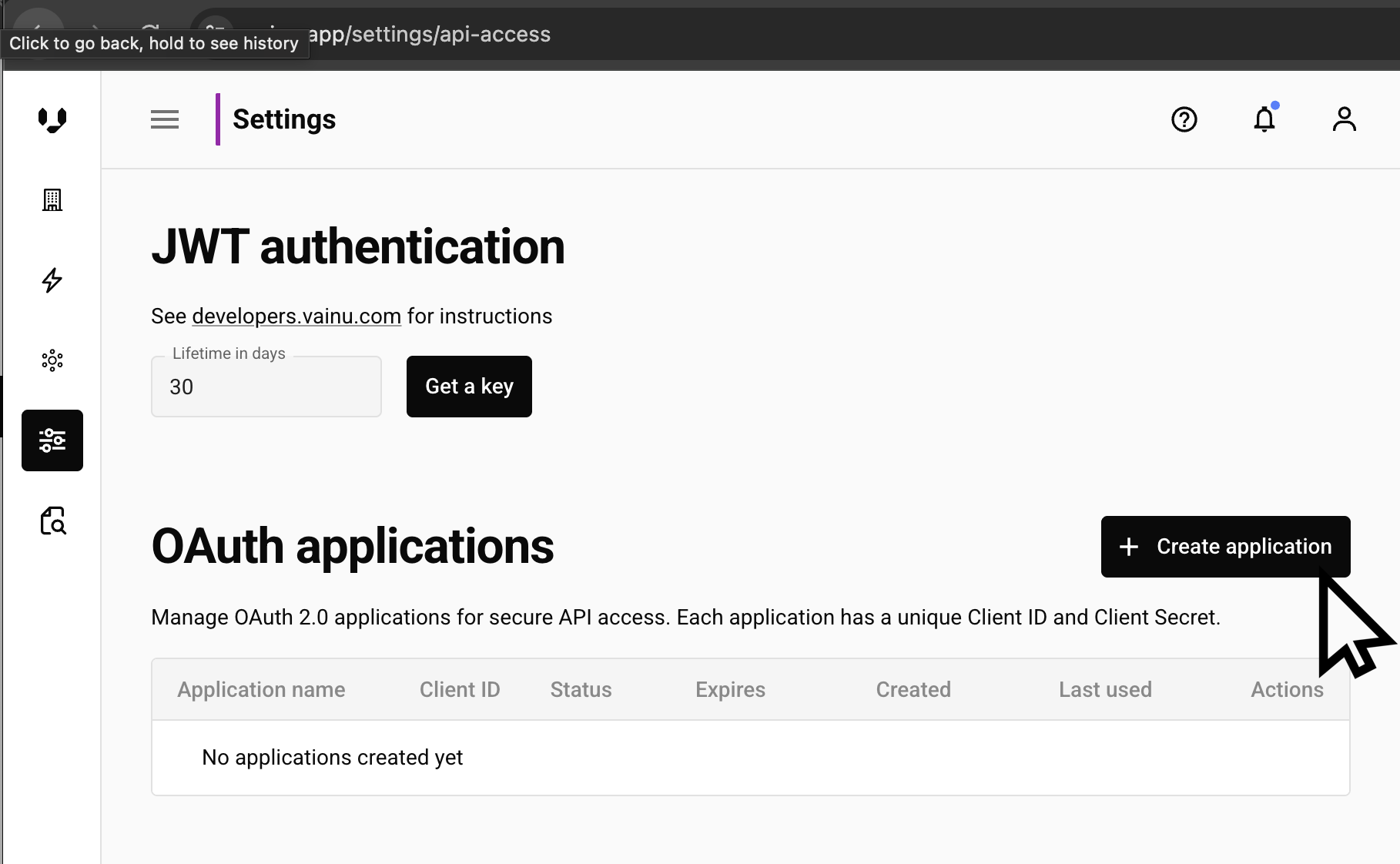
❗ Save your Client Secret
Your Client Secret is only shown once. Make sure to copy or download it as a JSON file immediately. You can view your Client ID anytime in the user interface.
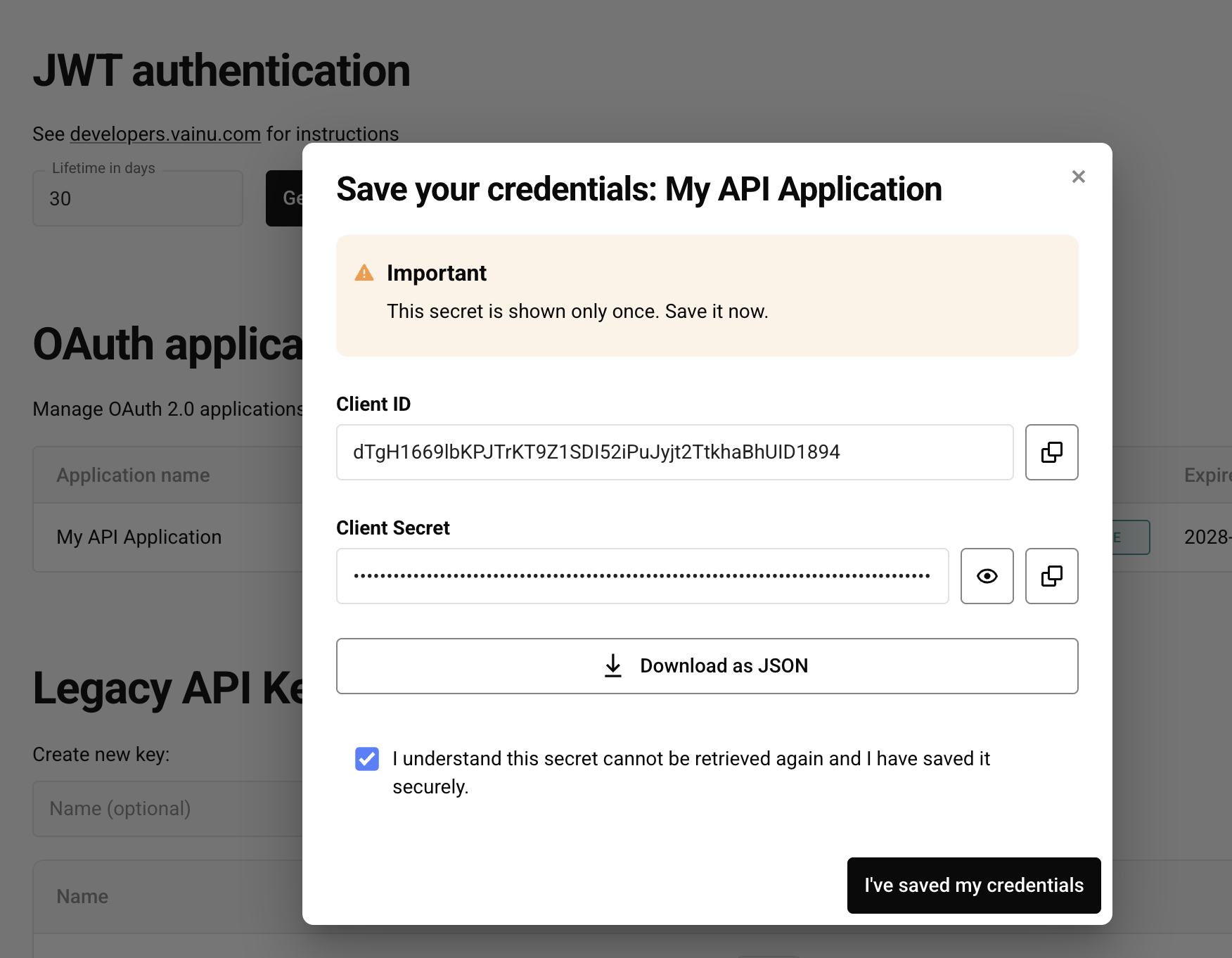
See and edit your OAuth Applications in the UI
Once created, you can view and edit all your OAuth applications by navigating to Settings > API Access in the Vainu Platform.
| Action | Description |
|---|---|
| 🖊️ Edit | Modify expiry date |
| ✖️Deactivate ✔️ Activate | Deactivate Application (without deleting it). Can be reactivated if needed. |
| Rotate client secret | Create new Client Secret. Old Client Secret will stop working immediately. You will be shown the new Client Secret one time. Remeber to save it! |
| Delete | You will be prompted to confirm this permanent deletion. ⚠️ This action cannot be undone. All tokens issued by this application will be immediately revoked and become completely inaccessible.. |
Full example
"""Simple OAuth client credentials example for Vainu API.

What this script does:
1. Reads OAuth client credentials from environment variables.
2. Requests an access token from `/api/oauth/token/`.
3. Fetches one organization from `/api/v3/organizations/` by business ID.
4. Prints the API response JSON.

Required environment variables:
- VAINU_CLIENT_ID
- VAINU_CLIENT_SECRET

# In Mac/Unix:
export VAINU_CLIENT_ID="your_client_id"
export VAINU_CLIENT_SECRET="your_client_secret"

Run:
        python api_client_key_secret_simple.py

Notes:
- This is intentionally minimal and does not include retries, timeouts, or
    advanced error handling.
"""

import os, requests

CLIENT_ID = os.environ["VAINU_CLIENT_ID"]
CLIENT_SECRET = os.environ["VAINU_CLIENT_SECRET"]
BUSINESS_ID = "FI25578642"

# Step 1: exchange client credentials for an OAuth access token.
response = requests.post(
    "https://api.vainu.io/api/oauth/token/",
    data={
        "grant_type": "client_credentials",
        "client_id": CLIENT_ID,
        "client_secret": CLIENT_SECRET,
        "scope": "vainu:api",
    },
)
response.raise_for_status()
access_token = response.json()["access_token"]

# Step 2: call organizations endpoint with bearer token authorization.
response = requests.post(
    "https://api.vainu.io/api/v3/organizations/",
    json={
        "query":  {"?EQ": {"business_id": BUSINESS_ID}},
        "database": "FI",
        "fields": ["business_id", "name"],
    },
    headers={"Authorization": f"Bearer {access_token}"},
)
response.raise_for_status()

# Step 3: print raw response payload.
print(response.json())
# [{'name': 'Vainu. io Software Oy', 'business_id': 'FI25578642'}]
Always store your client secret securely. Use environment variables or a secrets manager - never commit credentials to version control.
Step 3: Handle Token Expiration
Access tokens have a limited lifetime. When your token expires use the Client ID and Client Secret to get a new one:
def get_fresh_access_token():
    """Retrieve a fresh access token"""
    return requests.post(
        "https://api.vainu.io/api/oauth/token/",
		    data={
            "grant_type": "client_credentials",
            "client_id": CLIENT_ID,
            "client_secret": CLIENT_SECRET,
        },
     ).json()["access_token"]

# When making requests, check if token is still valid
# If not, get a new one
access_token = get_fresh_access_token()
Error Handling
Common errors and solutions:
| Error | Cause | Solution |
|---|---|---|
invalid_client | Invalid client ID or secret | Verify credentials are correct |
invalid_grant | Invalid grant type | Use client_credentials |
400 Bad Request | Malformed request | Check payload format |
401 Unauthorized | Invalid token for API request | Verify access token is included |
Updated 4 months ago